
Table of Contents
By default, Safari tries to hide the full address of any website you visit, only revealing the domain name. It helps with clutter, but sometimes you might want to see the full URL in Safari.

How to show full website addresses in Safari on Mac
To show the entire URL in the Safari address bar on a Mac, follow these steps:
1. Launch Safari > Preferences
Note
Alternatively: In macOS, you can open the Preferences by the combined keys
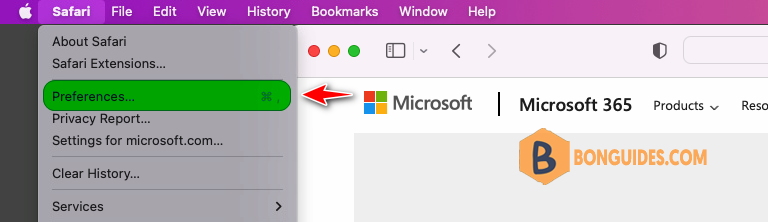
2. Click on the Advanced section.
3. Select the checkbox Show full website address.
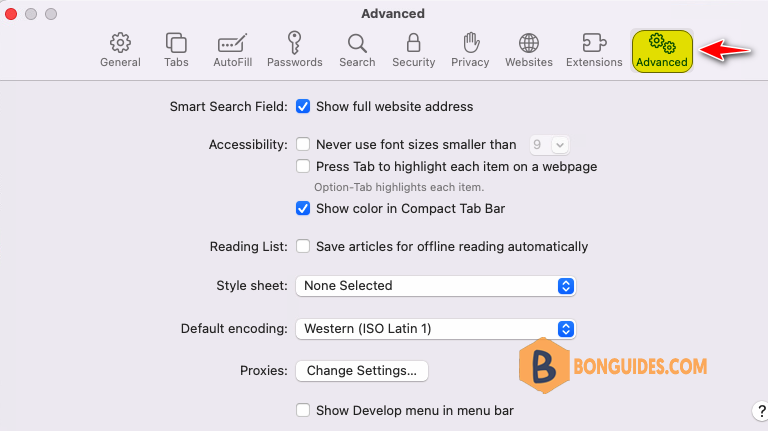
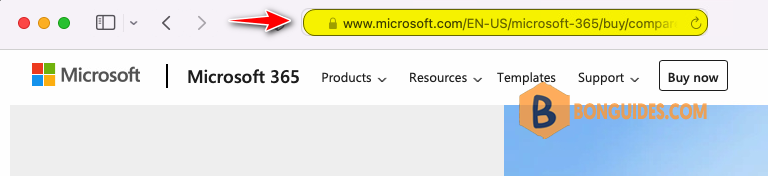
Close the Safari’s preferences window. Now, Safari will display the full URL in the address bar, including the “https://”, “www”, and any other parts of the URL that were previously hidden.
Related Titles:
- How to Show Full URL in Safari on Mac
- Safari Full URL Display Guide
- Safari Address Bar Tips: Display Full URL
- Enable Full Website Address in Safari on Mac
- How to See Entire URL in Safari Browser
- Complete Guide to Showing Full URL in Safari
- Safari Mac Tutorial: Display Full URL in Address Bar
- How to Show Full Web Address in Safari on Mac
- Safari Settings: Show Full URL in Address Bar
- Quick Tip: Display Full URL in Safari on Mac
- How to Make Safari Show Complete URL
- Step-by-Step Guide to Display Full URL in Safari
- How to Enable Full URL View in Safari on Mac
- Show Full Address in Safari Address Bar Mac
- How to See Full Website Address in Safari
Keywords:
show full URL in Safari Mac, Safari address bar full URL, display complete URL Safari Mac, show entire web address Safari, enable full URL Safari Mac, Safari Mac tips, Safari full address bar, Safari settings Mac, how to show full URL Safari, Mac Safari full URL view
Hashtags:
#SafariTips, #MacTutorial, #TechGuide, #SafariBrowser, #MacOS, #FullURLSafari, #MacSafariTips, #SafariHowTo, #MacOSGuide, #bonguides


