
Table of Contents
Currently, CyberPanel is growing and constantly releasing new upgraded versions to integrate more useful features. However, for users using the old version, if they want to use the new features, they need to upgrade to the latest version of CyberPanel.
Check the CyberPanel Version from GUI
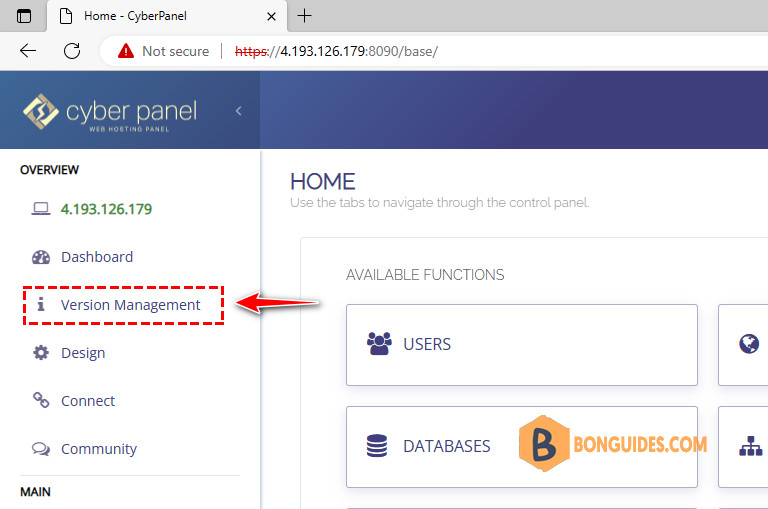
First of all, you can check the version of Cyber Panel at the homepage.
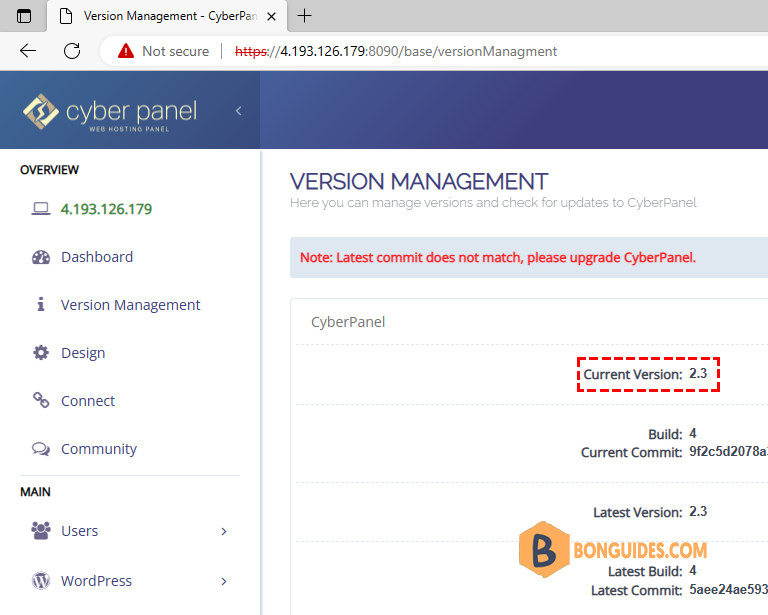
Next, you can see the current version in use by going to the CyberPanel admin interface => click Version Management.
This example currently uses CyberPanel version 2.3.
Check the CyberPanel Version from command line
The second way, we can check the CyberPanel using command line.
1. SSH into your VPS as root.
2. We need install the required packages:
sudo apt install python3 python3-requests lynx -y3. Now, using this command to check CyberPanel version.
lynx http://yourhostingip:8090/4. Say Y for every ask. So, you can view the site and CyberPanel version in command line.
SSL error:The certificate is NOT trusted. The certificate issuer is unknown. -Continue? (n)
SSL error:host(4.193.110.113)!=cert(CN<webadmin>)-Continue? (n)
4.193.110.113 cookie: csrftoken=XZgT6MHcTvu8i8THnse1FsU...2DwzxaNsO Allow? (Y/N/Always/neVer)
4.193.110.113 cookie: SameSite=Lax Allow? (Y/N/Always/neVer)
WEB HOSTING CONTROL PANEL FOR EVERYONE
Powered By OpenLiteSpeed/LiteSpeed Enterprise. Built For Speed, Security and Reliability.
...
Change Logs
Stay up to date about new releases and features.
Learn More
[cyber-panel-logo.svg] CyberPanel v 2.3
Web Hosting Control Panel
____________________
____________________
[loading.gif]
____________________
[English___]
(BUTTON) Sign In
Could Not Login, Error message: {$ errorMessage $}
(NORMAL LINK) Use right-arrow or <return> to activate.
Arrow keys: Up and Down to move. Right to follow a link; Left to go back.
H)elp O)ptions P)rint G)o M)ain screen Q)uit /=search [delete]=history list

