
Table of Contents
Normally, closing the lid of your laptop will make it go to sleep. But that might not be the best option if want to keep your laptop on for listening to music or downloading a file. Here’s everything you need to know about how to keep your Windows 10 laptop on when it’s closed.
Keep a Windows 10 Laptop on When It’s Closed using Control Panel
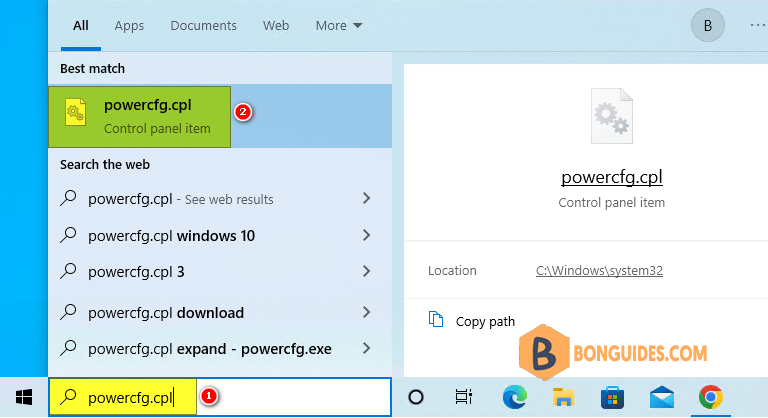
1. Type powercfg.cpl into the Windows search box then select it from the result to open Power Options.
Note
Alternatively: You can open it from
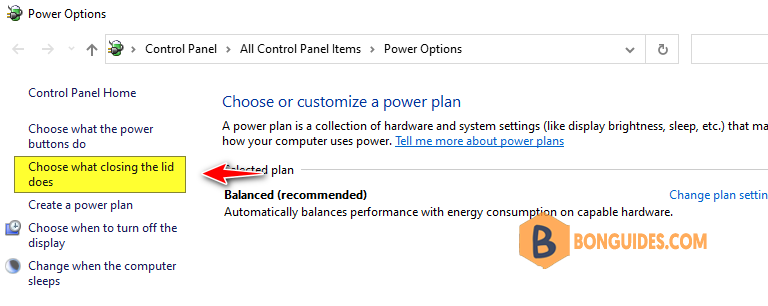
2. Next, click Choose what closing the lid does. You’ll find this in the left sidebar of the window
3. Then, choose Do Nothing next to When I close the lid. Make sure to change the settings under both On battery and Plugged in.
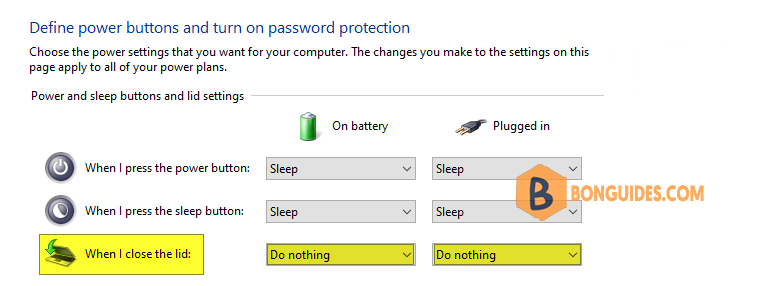
Finally, click Save button to save the changes. Open your favorite track then close your laptop to verify it works.

