
Table of Contents
In this article, we will discuss how to use Get-Command and Get-Help cmdlets in PowerShell to get a list of all available parameters for cmdlet.
Connect-MgGraphGet Parameters with Get-Command
Using the Get-Command cmdlet in PowerShell, you can get the list of all available parameters for the PowerShell cmdlet. Get-Command cmdlet gets cmdlet all parameters that include required as well as optional parameters.
(Get-Command Connect-MgGraph).ParametersIn the above PowerShell script, Get-Command uses the exact name of the PowerShell cmdlet Connect-MgGraph and uses Parameters to get all parameters for the cmdlet.
Key                    Value
---                    -----
Scopes                 System.Management.Automation.ParameterMetadata
ClientId               System.Management.Automation.ParameterMetadata
CertificateSubjectName System.Management.Automation.ParameterMetadata
CertificateThumbprint  System.Management.Automation.ParameterMetadata
Certificate            System.Management.Automation.ParameterMetadata
ClientSecretCredential System.Management.Automation.ParameterMetadata
AccessToken            System.Management.Automation.ParameterMetadata
TenantId               System.Management.Automation.ParameterMetadata
ContextScope           System.Management.Automation.ParameterMetadata
Environment            System.Management.Automation.ParameterMetadata
UseDeviceCode          System.Management.Automation.ParameterMetadata
ClientTimeout          System.Management.Automation.ParameterMetadata
Identity               System.Management.Automation.ParameterMetadata
EnvironmentVariable    System.Management.Automation.ParameterMetadata
Break                  System.Management.Automation.ParameterMetadata
Verbose                System.Management.Automation.ParameterMetadata
Debug                  System.Management.Automation.ParameterMetadata
ErrorAction            System.Management.Automation.ParameterMetadata
WarningAction          System.Management.Automation.ParameterMetadata
InformationAction      System.Management.Automation.ParameterMetadata
ErrorVariable          System.Management.Automation.ParameterMetadata
WarningVariable        System.Management.Automation.ParameterMetadata
InformationVariable    System.Management.Automation.ParameterMetadata
OutVariable            System.Management.Automation.ParameterMetadata
OutBuffer              System.Management.Automation.ParameterMetadata
PipelineVariable       System.Management.Automation.ParameterMetadata
When you like it user-friendly. So, you can run the below command:
PS C:\> (Get-Command Connect-Graph).Parameters.Values | Select-Object Name,Aliases,Switchparameter

Name                   Aliases                                                   SwitchParameter
----                   -------                                                   ---------------
Scopes                 {}                                                                  False
ClientId               {AppId, ApplicationId}                                              False
CertificateSubjectName {CertificateSubject, CertificateName}                               False
CertificateThumbprint  {}                                                                  False
Certificate            {}                                                                  False
ClientSecretCredential {SecretCredential, Credential}                                      False
AccessToken            {}                                                                  False
TenantId               {Audience, Tenant}                                                  False
ContextScope           {}                                                                  False
Environment            {EnvironmentName, NationalCloud}                                    False
UseDeviceCode          {UseDeviceAuthentication, DeviceCode, DeviceAuth, Device}            True
ClientTimeout          {}                                                                  False
Identity               {ManagedIdentity, ManagedServiceIdentity, MSI}                       True
EnvironmentVariable    {}                                                                   True
Break                  {}                                                                   True
Verbose                {vb}                                                                 True
Debug                  {db}                                                                 True
ErrorAction            {ea}                                                                False
WarningAction          {wa}                                                                False
InformationAction      {infa}                                                              False
ErrorVariable          {ev}                                                                False
WarningVariable        {wv}                                                                False
InformationVariable    {iv}                                                                False
OutVariable            {ov}                                                                False
OutBuffer              {ob}                                                                False
PipelineVariable       {pv}                                                                False
Get Parameters with Get-Help
You can use the Get-Help cmdlet to get help for PowerShell cmdlets. Using the Get-Help Parameter, you can get the list of all parameters for the cmdlet.
1️⃣ Get-Help with online link a about the cmdlet. After you ran the command, the browser would be opened automatically.
Get-Help Connect-MgGraph -Online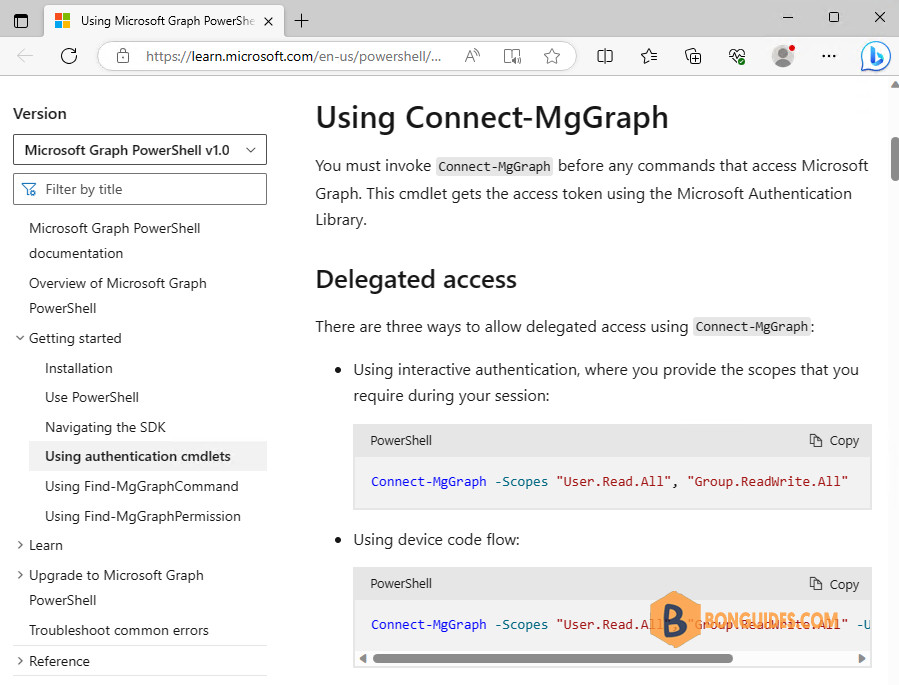
2️⃣ You can run Get-Help with the -ShowWindows parameter. It will open a new window, from here you can filter the information you need.
Get-Help Connect-MgGraph -ShowWindow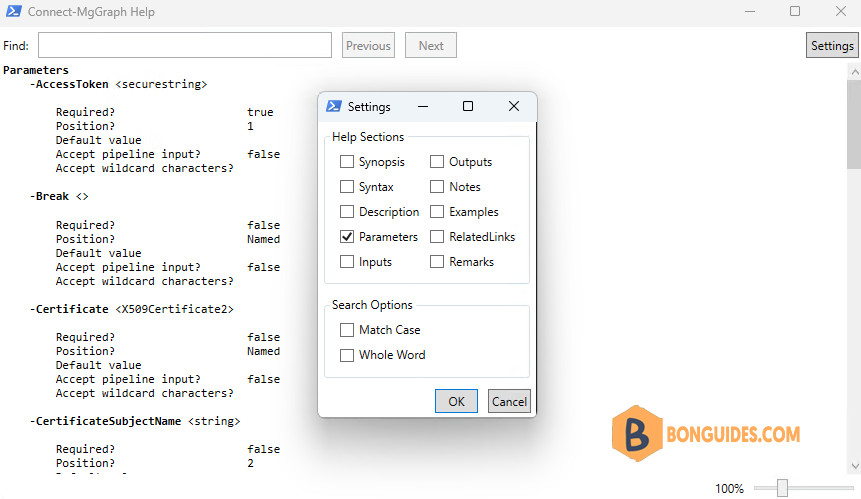
3️⃣ Get-Help can be used to get the examples for the cmdlet.
Get-Help Connect-MgGraph -ExamplesPS C:> Get-Help Get-MgUser -Examples
NAME
Get-MgUser
SYNOPSIS
Read properties and relationships of the user object.
-------------------------- EXAMPLE 1 --------------------------
PS C:>Connect-MgGraph -Scopes 'User.Read.All'
Get-MgUser -All | Format-List ID, DisplayName, Mail, UserPrincipalName
Id : e4e2b110-8d4f-434f-a990-7cd63e23aed6
DisplayName : Kristi Laar
Mail : [email protected]
UserPrincipalName : [email protected]
Id : dba12422-ac75-486a-a960-cd7cb3f6963f
DisplayName : Adele Vance
Mail : [email protected]
UserPrincipalName : [email protected]
-------------------------- EXAMPLE 2 --------------------------
PS C:>Connect-MgGraph -Scopes 'User.Read.All'
Get-MgUser -UserId 'e4e2b110-8d4f-434f-a990-7cd63e23aed6' |
Format-List ID, DisplayName, Mail, UserPrincipalName
Id : e4e2b110-8d4f-434f-a990-7cd63e23aed6
DisplayName : Kristi Laar
Mail : [email protected]
UserPrincipalName : [email protected]4️⃣ Show all information about parameters of a cmdlet:
Get-Help Connect-MgGraph -Parameter * | Select-Object Name,Required#Output
name required
---- --------
AccessToken true
Break false
Certificate false
CertificateSubjectName false
CertificateThumbprint false
ClientId true
ClientSecretCredential false
ClientTimeout false
ContextScope false
Environment false
EnvironmentVariable false
Identity false
Scopes false
TenantId false
UseDeviceCode false5️⃣ Show all information of a cmdlet:
Get-Help Get-ChildItem -FullConclusion
I hope the above article on how to get a list of all available parameters for PowerShell cmdlets using Get-Command and Get-Help cmdlets is helpful to you.

