
Table of Contents
Display the Output with Two Decimals in PowerShell
In this post, when checking the size of a folder using PowerShell. The output shows the size like the below example. In some cases, you want to make it shorter for readability.
$path = 'C:\Program Files\WindowsPowerShell\Modules\ExchangeOnlineManagement\3.3.0'
$folderSize = (Get-ChildItem $path -Recurse | Measure-Object -Property Length -Sum).Sum / 1MB
PS C:\> $folderSize
34.1878614425659There are two ways to do it as follow.
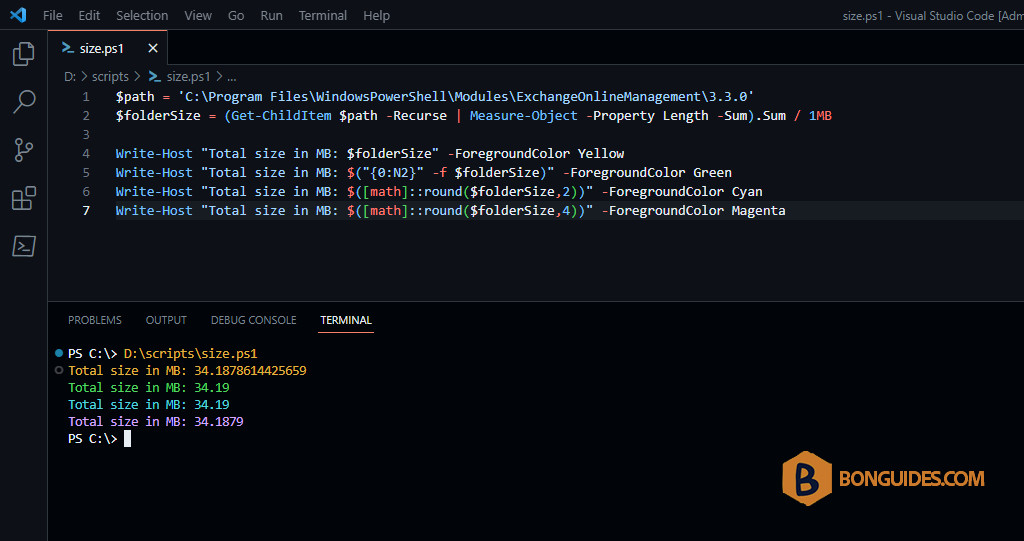
Use the -f format operator
The first way, we can use the -f format operator to display the output with two decimals only.
$path = 'C:\Program Files\WindowsPowerShell\Modules\ExchangeOnlineManagement\3.3.0'
$folderSize = (Get-ChildItem $path -Recurse | Measure-Object -Property Length -Sum).Sum / 1MB

$("{0:N2}" -f $folderSize)
# Output
34.19In -f format operator we provide the strings and numbers on the right-hand side and syntax on the left-hand side. Below are some examples.
# Display a number to 3 decimal places :
"{0:n3}" -f 123.45678
123.457

# Right align the first number only :
"{0,10}" -f 4,5,6
         4

# Left and right align text :
"|{0,-10}| |{1,10}|" -f "hello", "world"
|hello     ||     world|

# Display an integer with 3 digits :
"{0:n3}" -f [int32]12
012

# Separate a number with dashes (# digit place holder):
"{0:###-##-##}" -f 1234567
123-45-67

#Display a number as a percentage:
"{0:p0}" -f 0.5
50%

# Display a whole number padded to 5 digits:
"{0:d5}" -f 123
00123
Use the type math
The second way we can use the type math with its static method round() method.
$path = 'C:\Program Files\WindowsPowerShell\Modules\ExchangeOnlineManagement\3.3.0'
$folderSize = (Get-ChildItem $path -Recurse | Measure-Object -Property Length -Sum).Sum / 1MB

$([math]::round($folderSize,2))
# Output
34.19In case you want to display the output with four decimals instead of two decimals
$path = 'C:\Program Files\WindowsPowerShell\Modules\ExchangeOnlineManagement\3.3.0'
$folderSize = (Get-ChildItem $path -Recurse | Measure-Object -Property Length -Sum).Sum / 1MB

$([math]::round($folderSize,4))
# Output
34.1879

