
Table of Contents
We have enabled online archive for a user in Microsoft 365 but for some reasons emails are not being archived to Online Archive. Do we know what can be done to start archiving immediately?
MFA Work cycle
The Managed Folder Assistant (MFA) is an Exchange Mailbox Assistant that applies and processes the message retention settings that are configured in retention policies. Exchange Online Archiving can take up to 24 hours to begin archiving email out of the primary mailbox after it is enabled for a user in Microsoft 365. Other cause could be if the size of the mailbox in Exchange Online is less than 10 megabytes (MB). The retention policy runs automatically one time every seven days for mailboxes that are larger than 10 MB. However, the retention policy doesn’t automatically run for mailboxes that are smaller than 10 MB.
In some cases, you want to force the Managed Folder Assistant run immediately. Let’s get started.
Connect to Exchange Online PowerShell
Before you begin, you have Connect to Exchange Online PowerShell or you can open Windows PowerShell Admin then run following commands to install modules then connect to EXO PowerShell:
Set-ExecutionPolicy -ExecutionPolicy RemoteSigned -Scope LocalMachine -Force;
Install-PackageProvider -Name NuGet -Force;
Set-PSRepository -Name "PSGallery" -InstallationPolicy Trusted;
Install-Module -Name ExchangeOnlineManagement;
Import-Module ExchangeOnlineManagement;
Connect-ExchangeOnline;
Check last time Managed Folder Assistant ran
Once you’ve connected, you can Check the last time the Managed Folder Assistant ran on a single mailbox using following commands:
$logProps = Export-MailboxDiagnosticLogs [email protected] -ExtendedProperties
$xmlprops = [xml]($logProps.MailboxLog)
$xmlprops.Properties.MailboxTable.Property | ? {$_.Name -like "ELC*"}
As you can see in the screenshot below, the last time Managed Folder Assistant ran successfully on the mailbox [email protected] is 8/24/2023 6:43:22 AM.
Name                                    Value
----                                    -----
ElcAssistantLock                        0
ElcLastRunTotalProcessingTime           6264
ElcLastRunSubAssistantProcessingTime    1187
ElcLastRunUpdatedFolderCount            8
ElcLastRunTaggedFolderCount             0
ElcLastRunUpdatedItemCount              0
ElcLastRunTaggedWithArchiveItemCount    0
ElcLastRunTaggedWithExpiryItemCount     0
ElcLastRunDeletedFromRootItemCount      0
ElcLastRunDeletedFromDumpsterItemCount  0
ElcLastRunArchivedFromRootItemCount     0
ElcLastRunArchivedFromDumpsterItemCount 0
ELCLastSuccessTimestamp                 8/24/2023 6:43:22 AM
ElcLastRunSkippedNoTagItemCount         0
ElcLastRunSkippedWithTagItemCount       0
ElcLastRunSkippedNotExcludedItemCount   0
ElcFaiSaveStatus                        SaveSucceeded
ElcFaiDeleteStatus                      DeleteNotAttempted
Force the Managed Folder Assistant runs
Run Start-ManagedFolderAssistant cmdlet to force the MFA runs on a single mailbox immediately.
Start-ManagedFolderAssistant -Identity [email protected]If you need to force it for all mailboxes inside the tenant, use below script:
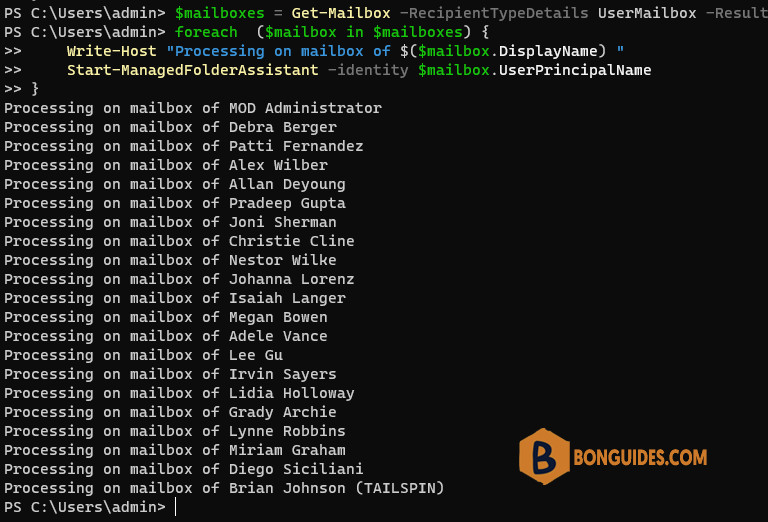
- Get the list of all mailboxes in a tenant then put it into a variable.
- Use PowerShell loop to run Start-ManagedFolderAssistant cmdlet on each mmailbox.
$mailboxes = Get-Mailbox -RecipientTypeDetails UserMailbox -ResultSize unlimited
foreach  ($mailbox in $mailboxes) {
    Write-Host "Processing on mailbox of $($mailbox.DisplayName) "
    Start-ManagedFolderAssistant -identity $mailbox.UserPrincipalName
}
You need to wait several minutes for it to run. You can check its progress using PowerShell.
In case you want to check last time the Managed Folder Assistant ran on all mailboxes in your tenant. The scriipt below would be helpful.
$mailboxes = Get-Mailbox -RecipientTypeDetails UserMailbox -ResultSize unlimited
$report = @()
$i = 0
foreach ($mailbox in $mailboxes) {
    $i++
    Write-Progress -Activity "Scanning Mailbox $($mailbox.DisplayName)" -Status "Scanned: $i of $($mailboxes.Count)"
    $logProps = Export-MailboxDiagnosticLogs $mailbox -ExtendedProperties
    $xmlprops = [xml]($logProps.MailboxLog)
    $elc = $xmlprops.Properties.MailboxTable.Property | Where-Object {$_.Name -like "ELCLastSuccessTimestamp"}

    $mbObj = New-Object PSObject
    $mbObj | Add-Member -MemberType NoteProperty -Name "DisplayName" -Value $mailbox.DisplayName
    $mbObj | Add-Member -MemberType NoteProperty -Name "UserPrincipalName" -Value $mailbox.UserPrincipalName
    $mbObj | Add-Member -MemberType NoteProperty -Name "ELCLastSuccessTimestamp" -Value $elc.Value
    $report += $mbObj
}
$report

#$report | Export-CSV C:\Scripts\Inboxsizes.csv
#$report | Out-GridView
PS C:\Users\admin> $report
DisplayName UserPrincipalName ELCLastSuccessTimestamp
----------- ----------------- -----------------------
MOD Administrator [email protected] 8/26/2023 5:36:46 AM
Debra Berger [email protected] 8/26/2023 5:36:24 AM
Patti Fernandez [email protected] 8/26/2023 5:36:22 AM
Alex Wilber [email protected] 8/26/2023 5:36:12 AM
Allan Deyoung [email protected] 8/26/2023 5:35:54 AM
Pradeep Gupta [email protected] 8/26/2023 5:36:29 AM
Joni Sherman [email protected] 8/26/2023 5:36:36 AM
Christie Cline [email protected] 8/26/2023 5:36:53 AM
Nestor Wilke [email protected] 8/26/2023 5:36:26 AM
Johanna Lorenz [email protected] 8/26/2023 5:36:02 AM
Isaiah Langer [email protected] 8/26/2023 5:36:10 AM
Megan Bowen [email protected] 8/26/2023 5:36:06 AM
Adele Vance [email protected] 8/26/2023 5:36:42 AM
Lee Gu [email protected] 8/26/2023 5:36:09 AM
Irvin Sayers [email protected] 8/26/2023 5:36:10 AM
Lidia Holloway [email protected] 8/26/2023 5:36:14 AM
Grady Archie [email protected] 8/26/2023 5:36:26 AM
Lynne Robbins [email protected] 8/26/2023 5:36:15 AM
Miriam Graham [email protected] 8/26/2023 5:37:34 AM
Diego Siciliani [email protected] 8/26/2023 5:36:32 AM
Brian Johnson (TAILSPIN) [email protected] 8/26/2023 5:36:18 AM


hello, I have tried these but for some reason archiving does not start. Is there a different way?
hey I am getting below error
$logProps = Export-MailboxDiagnosticLogs ***@***.com -ExtendedProperties
$xmlprops = [xml]($logProps.MailboxLog)
$xmlprops.Properties.MailboxTable.Property | ? {$_.Name -like “ELC*”}
What happened?