Table of Contents
Native SSH Client in Windows 10
The built-in SSH client appeared in Windows 10 and Windows Server 2019. ssh.exe can be used to securely connect to Linux/UNIX servers, VMWare ESXi hosts and other devices instead of Putty. The native Windows SSH client is based on the OpenSSH port and is preinstalled in Windows starting from Windows 10 build 1809.
The OpenSSH client is included in Windows 10 Features on Demand. The SSH client is installed by default on Windows Server 2019, Windows 10 1809 and newer builds.
Install OpenSSH Client using PowerShell
1️⃣ Check that the SSH client is installed. Open Windows PowerShell then run bellow command. In my example, the OpenSSH client is installed (State: Installed)
Get-WindowsCapability -Online | ? Name -like 'OpenSSH.Client*'Name : OpenSSH.Client~~~~0.0.1.0
State : Installed
#Output when OpenSSH client not installed
Name : OpenSSH.Client~~~~0.0.1.0
State : NotPresent2️⃣ If not (State: Not Present), you can install it using the PowerShell command: Add-WindowsCapability -Online -Name OpenSSH.Client*
Add-WindowsCapability -Online -Name OpenSSH.Client*Path :
Online : True
RestartNeeded : FalseAlternatively, OpenSSH Client can be enabled using DISM as below:
dism /Online /Add-Capability /CapabilityName:OpenSSH.Server~~~~0.0.1.0Deployment Image Servicing and Management tool
Version: 10.0.19041.844
Image Version: 10.0.19044.1706
[==========================100.0%==========================]
The operation completed successfully.Install OpenSSH Client using Windows Settings
If you don’t want to do it using PowerShell. You can enable it from Windows Settings.
1️⃣ Open Settings -> Apps -> Manage optional features.

2️⃣ Select +Add features.

3️⃣ Search for OpenSSH client in the list and click Install button.

Connect to a remote system with SSH
OpenSSH binary files are located in C:\Windows\System32\OpenSSH.
- ssh.exe – the SSH client executable;
- scp.exe – tool for copying files in an SSH session;
- ssh-keygen.exe – tool to generate RSA SSH authentication keys;
- ssh-agent.exe – used to manage RSA keys;
- ssh-add.exe – adds a key to the SSH agent database.
PS C:\WINDOWS\system32\OpenSSH> dir

    Directory: C:\WINDOWS\system32\OpenSSH

Mode                 LastWriteTime         Length Name
----                 -------------         ------ ----
-a----          1/8/2022   4:09 PM         307712 scp.exe
-a----          1/8/2022   4:09 PM         374272 sftp.exe
-a----          1/8/2022   4:09 PM         481280 ssh-add.exe
-a----          1/8/2022   4:09 PM         382976 ssh-agent.exe
-a----          1/8/2022   4:09 PM         662016 ssh-keygen.exe
-a----          1/8/2022   4:09 PM         557568 ssh-keyscan.exe
-a----          1/8/2022   4:09 PM         946176 ssh.exe
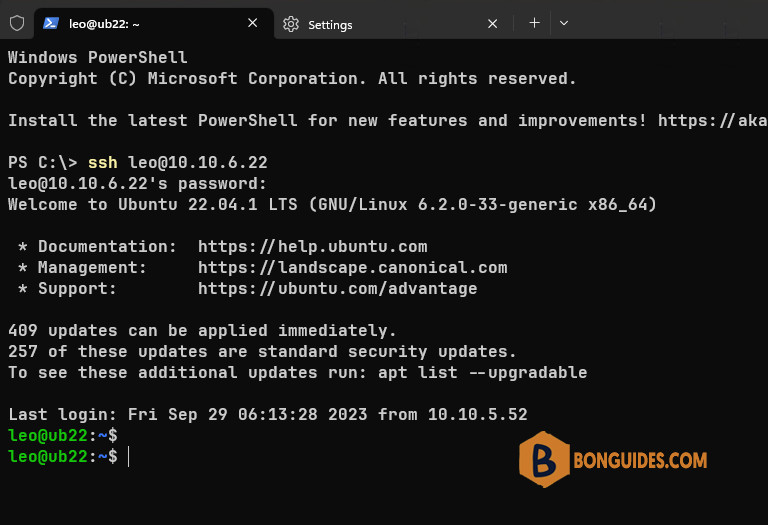
Once done, now we can use the Windows PowerShell to connect to a Linux machine using SSH natively.
Note
Related: How to use OpenSSH Client to connect to a Linux machine.
ssh <username>@<host_ip_address>

# For example:
ssh [email protected]
When you connect to a machine using SSH. For the first time you will need to accept the host’s key. Just type yes then hit Enter.
PS C:\> ssh [email protected]

The authenticity of host '10.10.6.22 (10.10.6.22)' can't be established.
ECDSA key fingerprint is SHA256:PeU7o9cNTIhcNPGtYOOPXs/p8b4WfMLJ752yMUPO/Ts.
Are you sure you want to continue connecting (yes/no/[fingerprint])? yes

Warning: Permanently added 10.10.6.22' (ECDSA) to the list of known hosts.
[email protected] password:
Last login: Mon May 30 02:36:11 2022 from 20.232.18.206
If you have SSH running on a different port than the default port 22, then you can change the port number with the -p flag: