Table of Contents
Change Color of Read-Host Command in PowerShell
Is it possible to change the color of the Read-Host in PowerShell?
Write-Host "Enter your Username:" -ForegroundColor Yellow

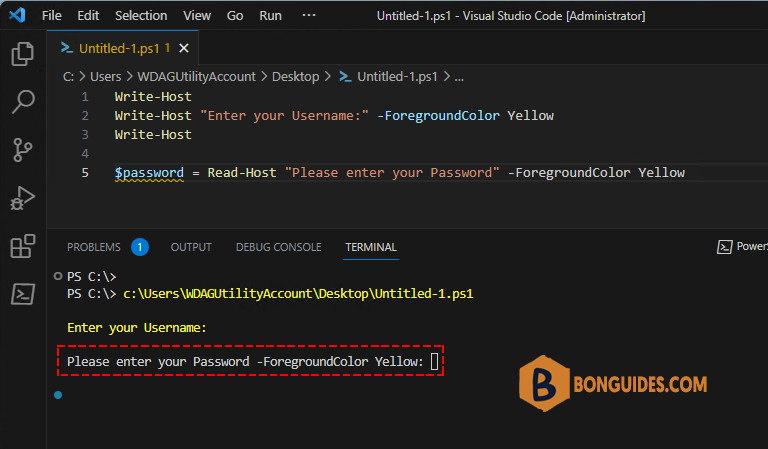
$password = Read-Host "Please enter your Password" -ForegroundColor Yellow
You can easily change the color in Write-Host using “-ForegroundColor” parameter but when you tried to use “-ForegroundColor” with Read-Host, it’s not worked and print the “-ForegroundColor” in the Read-Host message as follows:
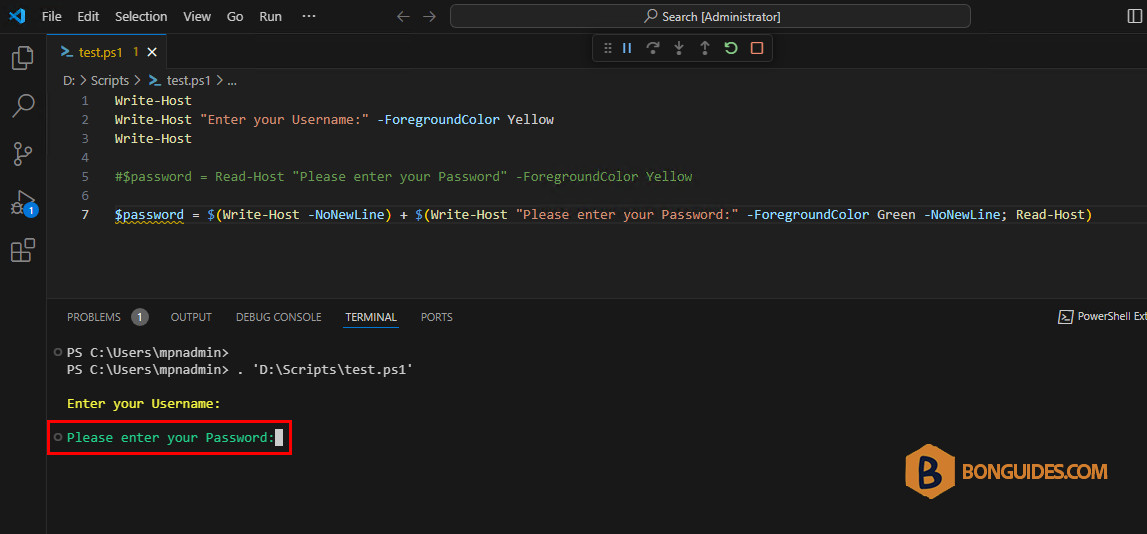
Unfortunately, Read-Host does not have a -ForegroundColor parameter. However, you can use Write-Host with -ForegroundColor as a workaround to use color in Read-Host as below:
Write-Host "Enter your Username:" -ForegroundColor Yellow
#$password = Read-Host "Please enter your Password" -ForegroundColor Yellow

$password = $(Write-Host -NoNewLine) + $(Write-Host "Please enter your Password:" -ForegroundColor Green -NoNewLine; Read-Host)